请求
首先了解到get和post方式有什么不同
- GET参数通过URL传递,POST放在Request body中。
其余不同在一下博客中有说到
https://blog.csdn.net/l_fireworks/article/details/114131299
SpringBoot的启动类。
1
2
3
4
5
6
7
8
9
10
11
| package com.kyxlnx.jkstest;
import org.springframework.boot.SpringApplication;
import org.springframework.boot.autoconfigure.SpringBootApplication;
import org.springframework.web.bind.annotation.RestController;
@SpringBootApplication
@RestController
public class JksTestApplication {
public static void main(String[] args) {
SpringApplication.run(JksTestApplication.class, args);
}
}
|
简单参数
1、使用原始方式获取参数
- 需要通过HttpServletRequest对象手动获取
请求路径(get方式):http://localhost/simpleParam?name = Tom & age = 10
1
2
3
4
5
6
7
8
9
10
11
12
13
14
15
16
| package com.kyxlnx.jkstest.controller;
import org.springframework.web.bind.annotation.RequestMapping;
import org.springframework.web.bind.annotation.RequestParam;
import org.springframework.web.bind.annotation.RestController;
import javax.servlet.http.HttpServletRequest;
@RestController
public class RequestController {
@RequestMapping("/simpleParam")
public String simpleParam(HttpServletRequest request){
String name = request.getParameter("name");
String ageStr = request.getParameter("age");
int age = Integer.parseInt(ageStr);
System.out.println(name +":" + age);
return "OK";
}
}
|
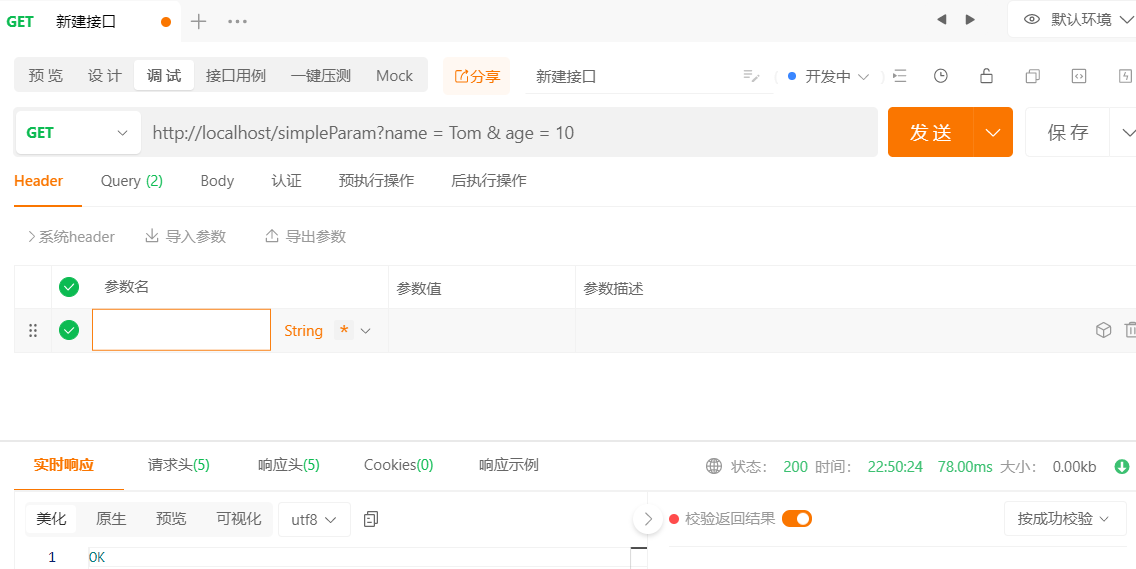
idea中结果Tom:10
2、SpringBoot方式
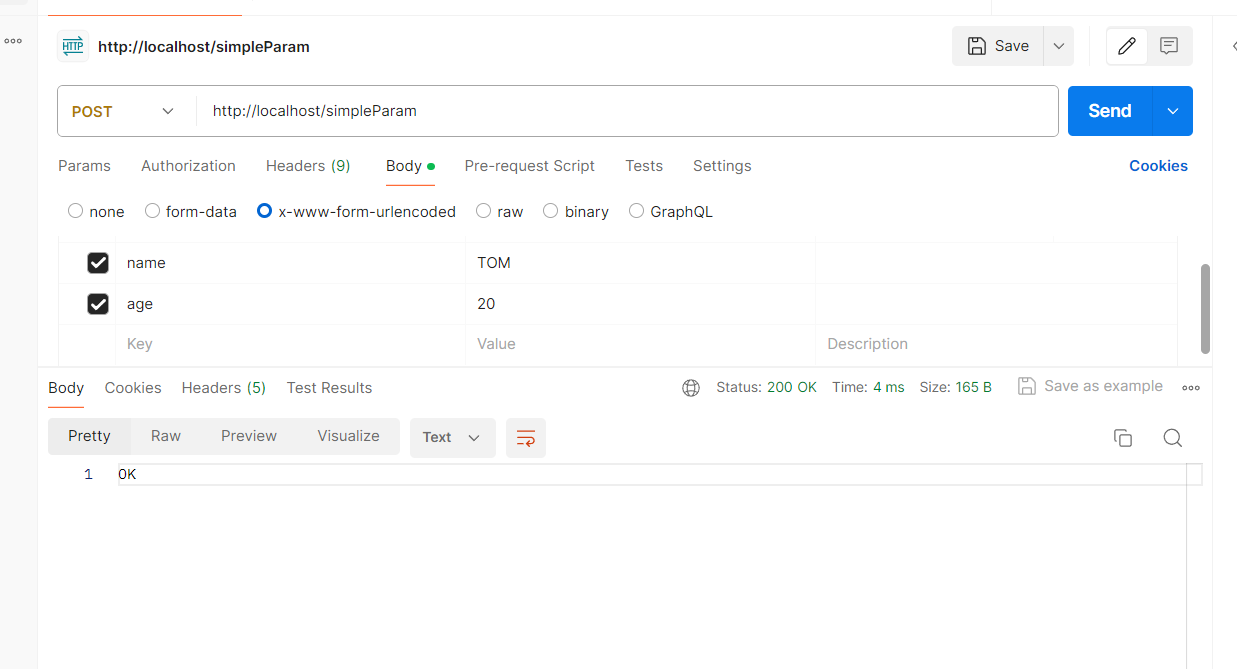
请求路径(get方式)URL地址:http://localhost/simpleParam?name = Tom & age = 10当然也没有问题。
请求路径(post方式)URL地址:http://localhost/simpleParam,在请求体中填入name,age
1
2
3
4
5
6
7
8
9
10
11
12
13
14
| package com.kyxlnx.jkstest.controller;
import org.springframework.web.bind.annotation.RequestMapping;
import org.springframework.web.bind.annotation.RequestParam;
import org.springframework.web.bind.annotation.RestController;
import javax.servlet.http.HttpServletRequest;
@RestController
public class RequestController {
@RequestMapping("/simpleParam")
public String simpleParam(String name, Integer age){
System.out.println(name +":" + age);
return "OK";
}
}
|
如果请求参数名不一致
1
2
3
4
5
6
7
8
9
10
11
| package com.kyxlnx.jkstest.controller;
import org.springframework.web.bind.annotation.RequestMapping;
import org.springframework.web.bind.annotation.RequestParam;
import org.springframework.web.bind.annotation.RestController;
import javax.servlet.http.HttpServletRequest;
@RequestMapping("/simpleParam")
public String simpleParam(String username, Integer age){
System.out.println(username +":" + age);
return "OK";
}
|
“OK”也会响应过来,但是idea输出 null 20
如果请求参数名不一致,又要接收正确的参数,就要使用SpringBoot的一个注解就是@RequestParam,并且通过name属性指明请求的参数名是什么。
就是将第一句置换为
1
| public String simpleParam(@RequestParam(name = "name") String username, Integer age)
|
即可。
@RequestParam中的required属性默认为true,代表该请求参数必须传递,如果不传递将会报错,如果该参数是可选的,可以将required属性设置为false。
1
| public String simpleParam(@RequestParam(name = "name", required = false) String username, Integer age)
|
实体参数
1、简单实体参数
在简单实体参数接收的时候,前端传输了多少个请求参数,我们就需要在方法中声明多少个形参来进行接收。如果前端有很多参数呢?这时候就需要将这些参数封装在一个实体类中,比如就可以将name、age两个属性封装在User对象当中。
1
2
3
4
5
| @RequestMapping("/simplePojo")
public String simplePojo(User user){
System.out.println(user);
rerturn "OK"
}
|
要求请求参数名和实体类的属性名保持一致
1
2
3
4
| public class User{
private String name;
private Integer age;
}
|
2、复杂实体参数
- 复杂实体参数:请求参数名与形参对象名相同,按照对象层次结构的关系即可接收嵌套POJO属性参数
1
2
3
4
5
| public class User {
private String name;
private Integer age;
private Address address;
}
|
1
2
3
4
| public class Address {
private String province;
private String city;
}
|
请求的URL:http://localhost/complexPojo?name=nian&age=22&address.province=北京&address.city=北京
数组集合参数
- 数组参数:请求参数名称与形参数组名称相同且请求参数为多个,定义数组类型形参即可接收参数
请求路径localhost:80/arrayParam?hobby=game&hobby=java&hobby=string
1
2
3
4
5
| @RequestMapping("/arrayParam")
public String arrayParam(String[] hobby){
System.out.println(Arrays.toString(hobby));
return "OK";
}
|
- 集合参数:请求参数名称与形参名称相同,且请求参数为多个@RequestParam绑定参数关系。
请求路径localhost:80/listParam?hobby=game&hobby=java&hobby=string
1
2
3
4
5
| @RequestMapping("/listParam")
public String listParam(@RequestParam List<String> hobby) {
System.out.println(hobby);
return "OK";
}
|
日期时间类型参数
- 日期参数:使用@DataTimeFormat注解完成日期参数格式转换
请求路径:localhost:80/dateParam/?updateTime=2024-12-12 10:00:00
1
2
3
4
5
| @RequestMapping("/dateParam")
public String dateParam(@DateTimeFormat(pattern = "yyyy-MM-dd HH:mm:ss") LocalDateTime updateTime) {
System.out.println(updateTime);
return "OK";
}
|
Json参数
- Json参数:JSON数据的键名与形参对象的属性名相同,定义POJO类型形参即可接收参数,需要使用@RequestBody标识
1
2
3
4
5
6
7
8
| {
"name": "kyclnx",
"age": 20,
"address" : {
"province": "陕西",
"city": "咸阳"
}
}
|
请求路径:localhost:80/jsonParam
1
2
3
4
5
| @RequestMapping("/jsonParam")
public String jsonParam(@RequestBody User user) {
System.out.println(user);
return "OK";
}
|
路径参数
- 路径参数:通过请求URL直接传递参数,使用{……}来标识该路径参数,需要使用 @PathVariable 获取路径参数
请求路径:localhost:80/path/12
后面的12可以是任意数字
1
2
3
4
5
| @RequestMapping("/path/{id}")
public String pathParam(@PathVariable String id) {
System.out.println(id);
return "OK";
}
|
如果路径参数有多个
请求路径:localhost:80/path/1/it
1
2
3
4
5
| @RequestMapping("/path/{id}/{name}")
public String pathParam(@PathVariable Integer id, @PathVariable String name) {
System.out.println(id + ":" +name);
return "OK";
}
|